Showing posts with label Drafting. Show all posts
Showing posts with label Drafting. Show all posts
Thursday, 5 April 2012
Changes to My Music Video
After getting feedback for my music video, I was told the greenscreen backgrounds like the flourishes and colours didn't look as good as the rest of the footage, so I decided to add in lens flares instead to keep in theme with the rest of my video. Below is a video of an example of this change:

Saturday, 17 March 2012
Examples of Print work In Real Life


Here is the HMV website, I edited on Photoshop to show my CD in the number 1 spot, and what it would look like in the charts
I also made a Facebook Page for my artist. This is because my target audience could then like the page and keep updated on the latest news etc. Below is what the page would look like if it was real-

Examples of Print work In Real Life
I have created several different places to advertise my digipack/magazine advert, this is to show my productions in more of a realistic way and to see what they could actually look like if real. I used Adobe Photoshop to make these.


Here my magazine advert is shown in a cinema, this would be shown before the film comes on.

Here my magazine advert is shown on a big billboard in the city, this would grab the audience's attention as it stands out.

Here my advert is advertised in the Underground, I decided to choose it here as lots of people use the London Underground and it would grab a variety of audiences to make aware of my artists CD

This is the Bus Poster I made, It features the same information that my magazine advert provided, but its a smaller version so it fits onto buses.
Tuesday, 6 March 2012
Editing my Music Video: Filters
I have also been using different filters on After Effects to see what looks best, I chose one called 'Blue Crush' which made every clip a little darker and more blue, this was so overall my video looked more professional as all the clips were in the same colour and had a constant theme. Below are pictures I have taken from my music video to show my music video after i've put in the filter:


Wednesday, 29 February 2012
Making of Magazine Advert
This is a video of the construction of my magazine advert, I have hid the layers of my final production and it shows how I added each layer and the process it took me to create this advert.
Tuesday, 28 February 2012
Making My Digipack
This is the construction of my digipack front cover, I made this on Adobe Premiere Pro, and this video shows the different layers I used and the process I took to make it.
Sunday, 12 February 2012
Editing
I have just about finished my editing of my music video on Premiere!! Although when getting to the end of the song I realised it had a slight problem, I downloaded it from my home computer and it is a radio version, so at the end of the song has the radio presenter talking, I will need to change this version of the song.
I am also nearly finished with my final productions of the digipack-advert. Below are some pictures of my progress:
I still have a bit more to do, but these are what I have produced so far, I still need to create two more pages for my digipack.


I am also nearly finished with my final productions of the digipack-advert. Below are some pictures of my progress:
I still have a bit more to do, but these are what I have produced so far, I still need to create two more pages for my digipack.


Sunday, 29 January 2012
Green Screen Shoot
On Friday I did my Greenscreen shoot, this was my last shooting needed, it went really well, I got my performer to mime the whole song a few times, then got extreme close ups of her eyes and mouth, which was what I needed to fill gaps in my music video. Below are some screen shots from the shoot:


Friday, 20 January 2012
More Editing
So I started from scratch again today, it made me feel a lot better about my video as I think it looks better and more professional, I have also scheduled in the school timetable to reshoot my greenscreen as by editing, I have noticed I don't have enough shots for one of the verses, and the clips I do have are ok, but some are blurred and shaky. I think this is important as although I thought I had enough, it shows that some shots dont come out as expected etc.
I have done quite a lot this week, I am about just over half way through, still need to make some changes though. Here is some clips and pictures of the progress I,ve made;


I have done quite a lot this week, I am about just over half way through, still need to make some changes though. Here is some clips and pictures of the progress I,ve made;


Wednesday, 11 January 2012
The Start of Editing my Music Video
During class this week I have continued to begin editing my music video, I have imported all my clips and the song, which is around 3 minutes long. I have tried to follow my storyboards as much as possible, but I am also playing around with different clips to see what looks best. Below is what I have done so far:


As you can see above, I have added my clips in the timeline, and need to start editing them together so they fit with the music and fit well together.
Friday, 16 December 2011
Digipack drafts
During the past week I have also been drafting out inital ideas of what my digipack might look like. I will hopefully get feedback after christmas and improve these ideas.


Front Cover

Inside Left

Inside Right

Back Cover

Thursday, 15 December 2011
Magazine Advert Draft
I have made a first draft for my magazine advert, this was produced on Adobe Photoshop and I used a picture I took at my second location, I think the fonts and picture look effective together, but I still have ideas that I would like to improve it.


Thursday, 24 November 2011
Magazine Advert Draft
This is my magazine advert draft, my first draft is to have the artist walking away from the camera, showing just the back of her, with lights in the background blurred. I thought this could be quite effective as it would be at night time, so with the song title being ' All About Tonight' it could show that the artist is walking to her destination of having this 'great' night or is walking home from it, I will probably come up with more possible ideas before I create this production.
 It also features the title of the single/album, and the artist's name. It also states the date in which the CD is released.

Monday, 21 November 2011
Digi Pack draft
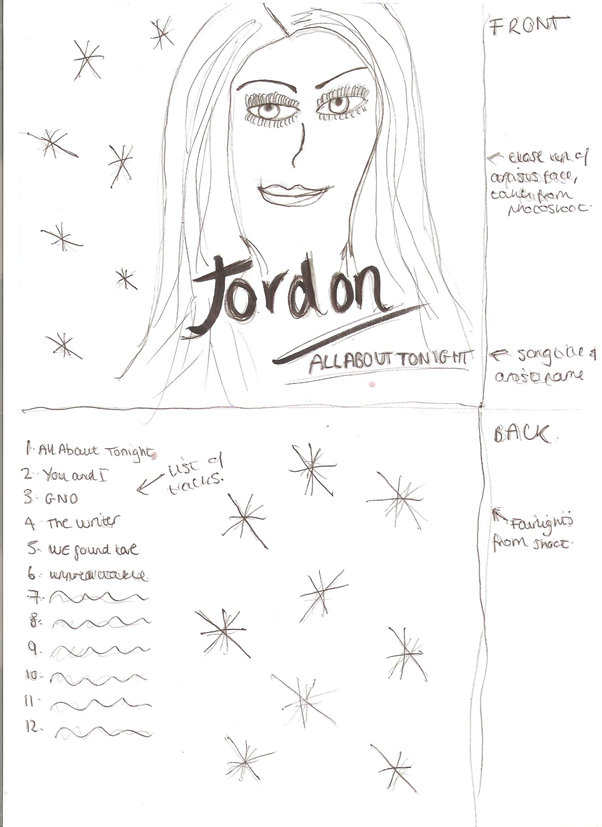
These are my drafts for my digipack ideas. I drew out two front and back covers, and then the inside of the cover. Although they aren't in great detail, I still think they will help me when designing the real product as I have an idea of what I need to do and possible ideas.

This is one of my drafts for my digipack front and back cover. I think this one would be successful because it features the artist on the front, and then has a image of the artist walking in heels across the back, which fits in with my music video theme.

This is the inside of my digipack, it features the booklet which shows the artist on a road, looking back at the camera, walking away. I thought this would look really effective with lights in the background and if shot at night time, with spot lights on the artist to make her stand out.

This is the actual CD in the digipack, it shows a high heeled shoe, with the title of the song featured as a tattoo on the foot, I thought this is quite effective as it fits in with the whole 'glamour' theme of my shoot.
Thursday, 17 November 2011
First Shoot- Greenscreen
My first shooting of my music video was done infront of the greenscreen at my school, it was a success and was really good to see how it all got set up, and here are a few pictures below:

This was the set I used when filming my video, I used the big lights either side, and used the fairylights to create this effect underneath:


Monday, 7 November 2011
Design Inspirations/ mood board
This is my Mood board, of inspiration for my music video. I collected images that I would like my theme for my video to represent, this helped me think of what kind of theme and ideas I would like to show.
View more presentations from laurapearce
Thursday, 27 October 2011
Storyboard for music video
Below are the sketches I drew out for my music video, I then placed them into this layout, which shows the sketch, then the detail of the shot, and when abouts in the song it is going to be shown. This is going to help me plan out my shots when it comes to filming a lot more easier.

This first sheet shows the beginning of the song, I have showed the variety of shots I would like to use, like going from extreme close ups to mid close ups.


Subscribe to:
Posts (Atom)